People keep posting their ChatGPT landscape design results in gardening groups, and the comments split the same way every time: half say it's a great idea machine, half point out the plant that would die in their climate. Both camps are right, and which one you end up in depends mostly on what you ask it to do.
Short answer: yes, ChatGPT can help with landscape design, but only part of it. It is good at talking a plan through, suggesting plants for a spot, writing a step-by-step project list, and editing a photo of your yard into a new look. It does not produce a measured plan, it doesn't know your soil or your exact frost dates unless you tell it, and the image result depends heavily on how specifically you describe the changes. Below is a real test on one backyard photo, and the prompts that get more out of it.
What ChatGPT does well for landscape design
ChatGPT is strongest at the thinking that comes before any digging. It doesn't get tired of follow-up questions, and the free plan covers the text side of everything below (as of October 2026, image generation on the free plan comes with usage limits that OpenAI changes over time). Four jobs it handles well:
- Brainstorming a direction. Describe the yard, how you use it and what bothers you about it, and ask for three different layouts in words. Cheap way to see options you hadn't considered.
- Plant shortlists for one spot. "Part shade, clay soil, 3 feet deep, along a north-facing fence" gets a far better list than "plants for my yard". Ask it to explain each pick and flag anything invasive in your state.
- Written plans and order of work. Ask it to turn a layout into phases, a materials list to price out, or questions to ask a contractor.
- Editing a photo of your yard. Upload a photo and ChatGPT's image generation can redraw it with new planting, paving or furniture. This is the part most people mean when they search for ChatGPT landscape design, so it's what we tested.
The test: one backyard photo, two tools
On October 20, 2026 we ran the same backyard photo through two tools. The yard is a typical suburban rectangle: a two-story house with gray vinyl siding, a chain-link fence on the left, a wood privacy fence at the back, a weedy lawn, wooden back steps, an AC unit against the wall, a trash can and one young tree.
For ChatGPT we uploaded the photo and used a plain prompt, the kind most people would type: "Redesign this backyard as a modern landscaped yard. Keep the same house, fence and layout." For Roomvana we used the backyard tool with the Modern style and no extra instructions.
 Before
 After
AfterWhat ChatGPT did: it respected the photo. The house, both fences, the back steps, the AC unit, the trash can, the tree and the camera angle all stayed where they were, and it didn't invent any odd objects or text. The changes were conservative: the lawn went from patchy to thick and even, curved beds of hydrangeas, coneflowers and ornamental grasses appeared along both fences and the house, and a short line of stepping stones runs past the steps. There's no seating area, no paved patio and no lighting. The result looks more like a classic perennial border than a modern yard. We ran it a second time and got an almost identical image.
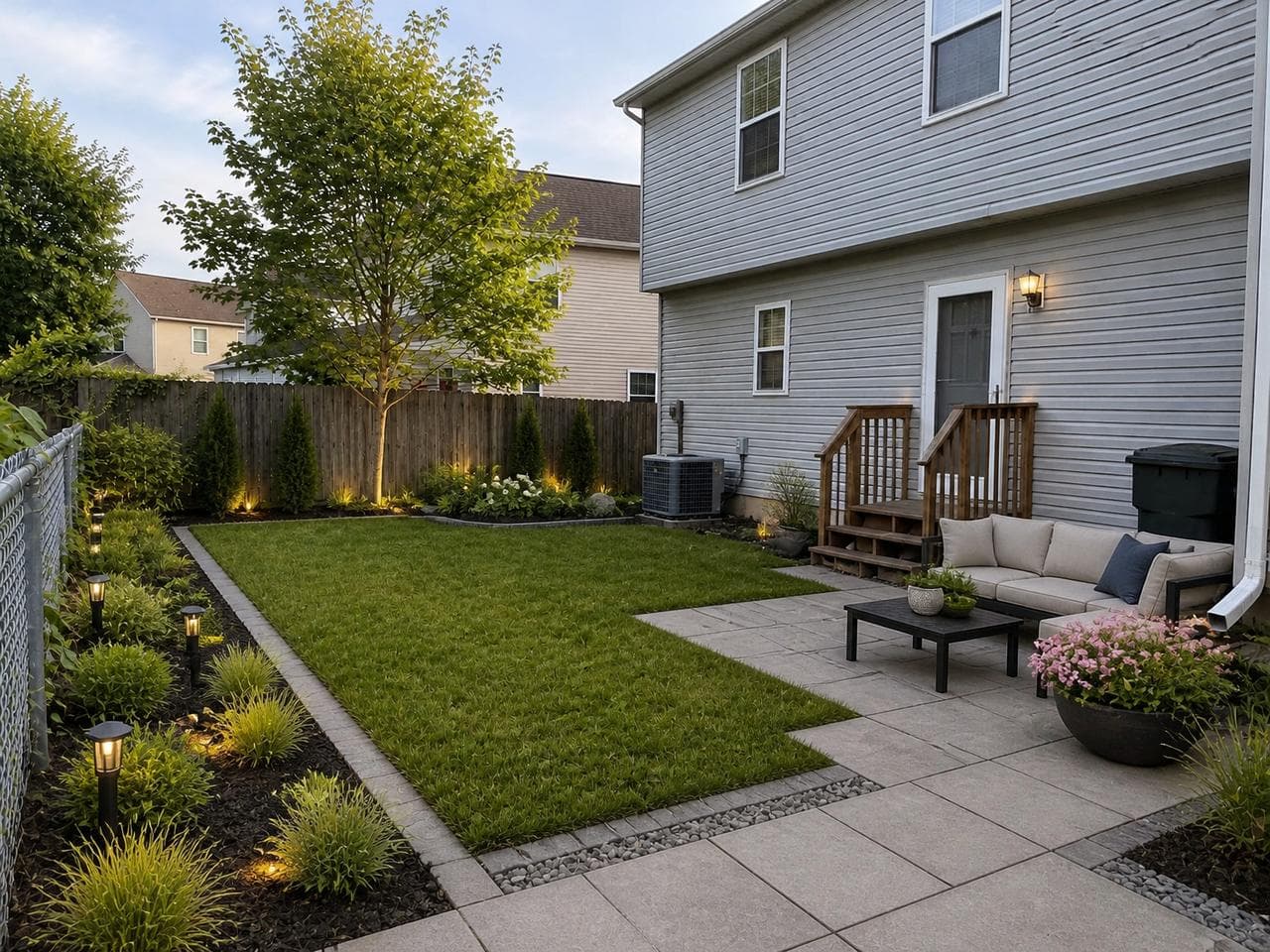
What Roomvana did: the same elements stayed (house, fences, steps, AC unit, trash can, tree, camera angle), but the yard itself changed much more. The lawn became a straight-edged panel with a stone border, a large paved patio with a gray outdoor sofa and a black coffee table took over the corner by the house, columnar shrubs line the wood fence, and low path lights run along the side bed.
Why the results differed
The gap in this test comes from instructions, not from one AI being smarter than the other. ChatGPT's result depends on the instructions you give it. "Modern landscaped yard" is vague, and "keep the same layout" reads as "don't move much", so it played it safe: fix the lawn, add borders. Behind every style button, Roomvana sends a full design brief for you: restyle the planting, lawn, paving, patio, furniture, water features and lighting to match the style, and keep the house, the fences and the camera angle exactly where they are. That's why one click gets you a complete redesign instead of a light touch-up.
That cuts both ways. With a more specific prompt, ChatGPT can go further than our plain test did, and the next section shows how. If you want a look beyond the available style presets, a conversation gives you more control.
One test on one photo doesn't settle anything about other yards, other styles or other prompts. In this test, the plain prompt produced a cautious edit.
How to prompt ChatGPT for landscape design
A good ChatGPT landscape design prompt gives it five things: your USDA hardiness zone, sun exposure, rough size, the style in concrete terms, and a list of what must stay. When details are missing, ChatGPT has to make assumptions. Find your zone on the USDA Plant Hardiness Zone Map before you start.
Prompt for a written plan
"I'm in USDA zone 6b. My backyard is about 40 by 30 feet, flat, with full sun at the back and shade along the house in the afternoon. Soil is heavy clay. We want a place for four people to sit, less lawn to mow, and low-maintenance planting. Keep the existing young maple and leave clear access to the AC unit. Suggest two layouts, a plant list for each bed with mature sizes, and flag anything invasive in the Midwest. Ask me questions if you need more information."
The last sentence matters. ChatGPT will ask about drainage, pets or budget if you invite it to, and those answers change the plan more than the style does.
Prompt for redesigning your yard photo
Describe the finished yard item by item instead of naming a style. For the test yard, a fuller version would look like this:
"Redesign this backyard photo as a modern landscape. Keep the house, siding, back door steps, AC unit, both fences, the tree and the camera angle exactly as they are. Add a large rectangular patio of light gray concrete pavers next to the house with an outdoor sofa and a low coffee table. Reshape the lawn into a clean rectangle with a stone edge. Plant a row of narrow upright evergreens and ornamental grasses along the wood fence, with dark mulch. Add low path lights along the side bed. Keep the plant palette simple: greens and white. No text or labels."
We haven't run this exact prompt in this test, so we can't show its result. It spells out the kind of detail Roomvana's style buttons handle for you, and that is the point: the more of the design you put into words, the less ChatGPT has to guess. If the first image changes too little, say what to add; if it changes the house or moves the fence, say "same as before, but keep the house exactly as in my photo" and try again.
Where ChatGPT and AI yard tools both fall short
Neither ChatGPT nor Roomvana gives you a scaled landscape plan. An AI image is a picture of how the yard could look from one spot, not a drawing with dimensions you can hand to a crew. If you ask ChatGPT for a plan view, you get a picture of a plan: proportions are approximate and labels can come out garbled. For bed sizes, patio square footage and spacing, measure the yard yourself and do the math, or ask ChatGPT to check your numbers in text.
- Plants in AI images are chosen for looks. The hydrangeas and coneflowers in ChatGPT's version, and the columnar shrubs in Roomvana's, are there because they read well in a photo. Before buying, check each one against your hardiness zone, your sun and your soil. Your state's cooperative extension service publishes regional plant lists that are a better final word than any chatbot.
- Text plant lists still need checking. ChatGPT can recommend a plant that's invasive in your area, or get mature sizes wrong. Ask it to explain its recommendations and cite sources, then verify the information on a cooperative extension or native plant society website.
- Neither knows what's underground. Before digging for a patio or planting trees, call 811 or use call811.com to get utility lines marked. It's free.
- Neither handles permits, grading or drainage. If water pools against the house today, a new patio can make it worse. That's a question for a contractor, not an image.
When to use ChatGPT, and when to use a yard design tool
Use ChatGPT when you're still working out what you want, when you need plant lists for a specific bed, or when you want a project broken into steps and costs to look up. It's also the better choice if you enjoy iterating in conversation and are willing to write detailed prompts.
Use a dedicated tool such as Roomvana's AI landscape design when you want to see several complete looks on your own yard quickly, without writing the brief yourself, and compare styles side by side. Roomvana is free to try after Google sign-in, and free designs carry a watermark. It doesn't produce plant lists, quantities or measured plans, so the two work well together: pick a direction from the images, then take it to ChatGPT to turn it into a plant list for your zone and a written project plan. If budget is the constraint, our budget backyard ideas list pairs well with either.
Try the same test on your own yard
Upload one photo of your backyard and compare a few styles. Sign in with Google to try it free.
Redesign my backyard